
In our test, Chirp 3 HD and Gemini 2.5 TTS both read a 101-word launch script almost word for word, going by Whisper’s transcripts. The differences were elsewhere: Gemini takes a written direction, which slowed Flash and sped Pro up; Gemini took 14.5 to 39.4 seconds to answer against Chirp’s 5.6; and the two are billed differently. Listen to all six clips.
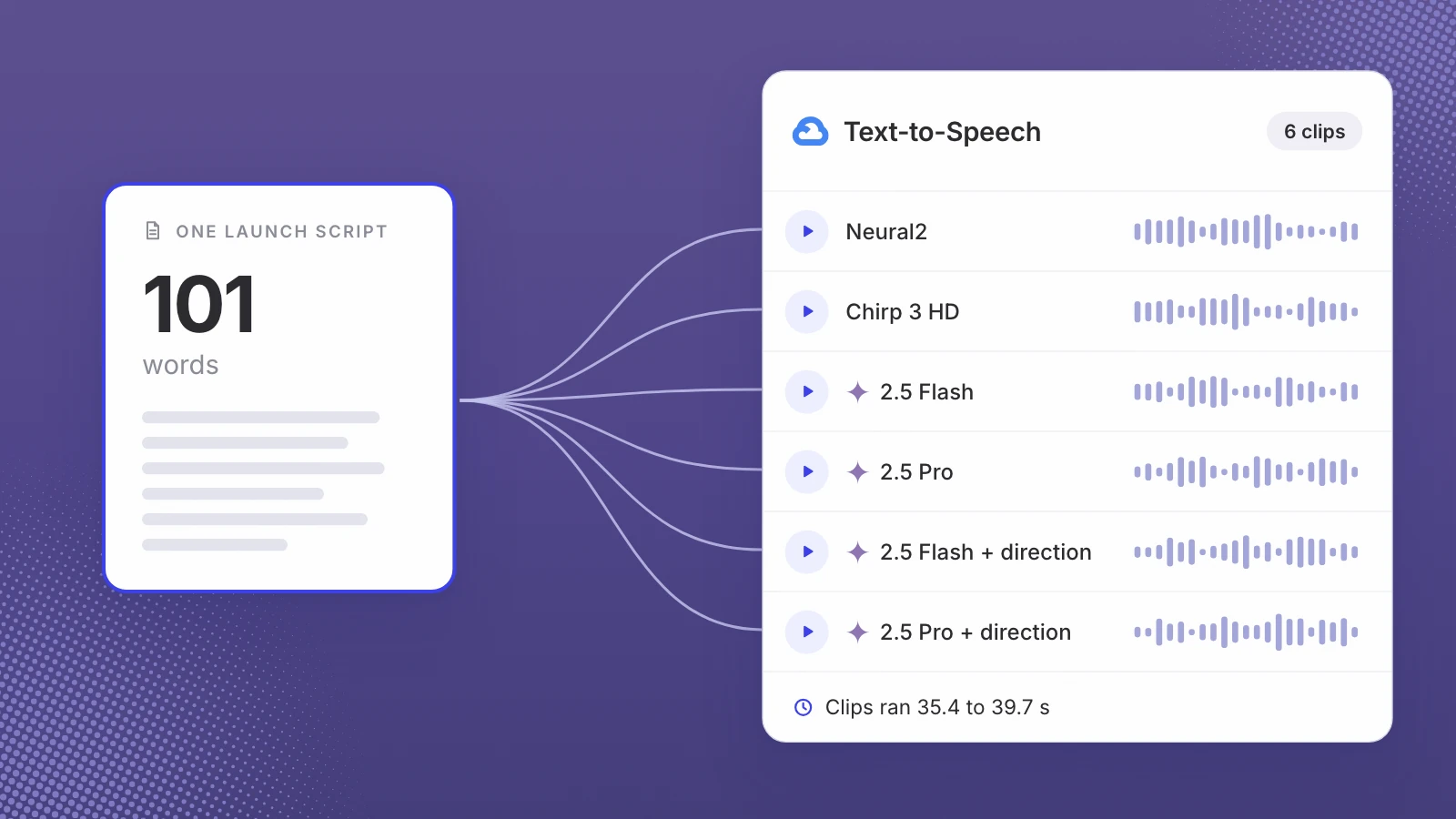
On 30 October 2026 we sent one launch script, 101 words and 537 characters, to Google Cloud Text-to-Speech and asked for six reads: Neural2, Chirp 3 HD, Gemini 2.5 Flash TTS and Gemini 2.5 Pro TTS, with each Gemini model run once plain and once with a written direction. Then we measured every file and had a transcriber write down what it heard.
Nobody scored these clips by ear, us included, so this post won’t tell you which one sounds best. You get the files, the measurements and the prices.
Every number below comes from one run of one script. The audio is the evidence.
What we tested
All six reads went through the same Google Cloud Text-to-Speech endpoint, in US English, returned as MP3. Five used the voice Aoede, which Google offers in both Chirp 3 HD and Gemini TTS. The Neural2 read used en-US-Neural2-F.
| Read | Model, as logged | Voice | Written direction |
|---|---|---|---|
| Neural2 | standard voices API | en-US-Neural2-F | No |
| Chirp 3 HD | standard voices API | en-US-Chirp3-HD-Aoede | No |
| Gemini 2.5 Flash TTS | gemini-2.5-flash-tts | Aoede | No |
| Gemini 2.5 Flash TTS, directed | gemini-2.5-flash-tts | Aoede | Yes |
| Gemini 2.5 Pro TTS | gemini-2.5-pro-tts | Aoede | No |
| Gemini 2.5 Pro TTS, directed | gemini-2.5-pro-tts | Aoede | Yes |
“Standard voices API” is how our log records the first two. For Neural2 and Chirp 3 HD the voice name picks the model, so no model name is sent. The Gemini reads name their model and carry the direction in the request’s prompt field, which Google describes as “styling instructions on how to synthesize the content in the text field”. Only the Gemini models got the direction.
For each file we measured:
- Length, and pace in words per minute: the script’s 101 words divided by the length.
- Pauses: every stretch quieter than −35 dB lasting at least 0.25 seconds, found with ffmpeg’s silencedetect filter. We counted them, added up their length and noted the longest.
- Integrated loudness, the average loudness of the whole clip in LUFS, from ffmpeg’s ebur128 filter.
- API time: how long Google took to send the audio back, timed once from our side.
- What a listener would hear: a transcript from Whisper small.en, the small English-only version of OpenAI’s speech recognition model, run locally.
- Four hard spots, checked in every transcript: Leo AI, $700, leo-ai.io and SaaS.
The script and the direction
“Your launch is in two weeks, and nobody on the team wants to be on camera. Good news: nobody has to. Send Leo AI your story and the footage you already have. You hear three voices read your script, pick one, and we cut it with your footage: vertical for Reels and Shorts, wide for YouTube. A launch cut with a voice is $700, delivered in 7 working days. Want your product animated too? We rebuild your real screens from your live site, like leo-ai.io. Made for SaaS teams who would rather ship than film. So, what are you launching next?”
Sent unchanged for all six reads
“Voice: a warm, upbeat narrator for a software product launch video. Pace: brisk but unhurried, with a short breath after each sentence. Say 'Leo AI' as 'Leo A.I.', 'leo-ai.io' as 'leo dash A.I. dot I.O.', 'SaaS' as 'sass' and '$700' as 'seven hundred dollars'. Lift the final question lightly, like you mean it.”
Sent with the two directed Gemini reads only
The script is written like a real launch voiceover, with four things a voice can get wrong: a product name with an abbreviation in it (Leo AI), a price ($700), a web address (leo-ai.io) and an abbreviation that can be said as a word or as letters (SaaS). The direction tells the model how to say each one, and sets a tone and a pace.
Listen to all six reads
These are the files exactly as Google returned them: no edit, no loudness matching, no music. Try them on headphones and on a phone speaker.
If you’d rather hear voices on your own script than run a test like this, our launch video page has three sample voices, and in the studio three realistic AI voices read the script we write with you.
Results: length, pace, pauses, loudness and API time
| Read | Seconds | Words a minute | Pauses (total) | Longest pause | Loudness (LUFS) | API time |
|---|---|---|---|---|---|---|
| Neural2 | 37.6 | 161 | 13 (6.7 s) | 0.79 s | −19.1 | 2.0 s |
| Chirp 3 HD | 39.7 | 153 | 16 (7.8 s) | 0.92 s | −23.5 | 5.6 s |
| Gemini 2.5 Flash TTS | 35.5 | 171 | 9 (3.1 s) | 0.44 s | −23.1 | 14.5 s |
| Gemini 2.5 Flash TTS, directed | 39.4 | 154 | 13 (4.9 s) | 0.49 s | −22.4 | 20.1 s |
| Gemini 2.5 Pro TTS | 37.8 | 160 | 13 (6.2 s) | 0.73 s | −19.0 | 28.3 s |
| Gemini 2.5 Pro TTS, directed | 35.4 | 171 | 12 (5.5 s) | 0.74 s | −22.3 | 39.4 s |
The six reads ran from 35.4 to 39.7 seconds, or 153 to 171 words a minute. Chirp 3 HD was the slowest and paused the most. Plain Gemini 2.5 Flash TTS paused least, and tied with directed Pro for the fastest pace.
Loudness spread 4.5 LU (loudness units) from the quietest read, Chirp 3 HD, to the loudest, plain Gemini 2.5 Pro TTS, with Neural2 a tenth behind it. That is raw output; nobody normalised it. Before you compare two voices, or lay music under one, bring every read to the same loudness.
API time varied most: 2.0 seconds for Neural2 and 5.6 for Chirp 3 HD, against 14.5 to 39.4 seconds for the Gemini reads. In this run the direction added time to both Gemini models, and directed Pro took longer to answer than the 35.4 seconds of audio it returned. That matters if someone waits on the voice inside an app. For a launch video you make once, it hardly does.
What the transcripts heard at the four hard spots
| Read | Leo AI | $700 | leo-ai.io | SaaS |
|---|---|---|---|---|
| Neural2 | “Leo AI” | “$700” | “leo-i.io” | “SaaS” |
| Chirp 3 HD | “Leo AI” | “$700” | “leo-ai.io” | “SaaS” |
| Gemini 2.5 Flash TTS | “Leo AI” | “$700” | “leo-ai.io” | “SaaS” |
| Gemini 2.5 Flash TTS, directed | “Leo AI” | “$700” | “leo-ai.io” | “SaaS” |
| Gemini 2.5 Pro TTS | “Leo AI” | “$700” | “leo-ai.io” | “SaaS” |
| Gemini 2.5 Pro TTS, directed | “Leo AI” | “$700” | “Leo dash AI.io” | “SAS” |
Each cell is what Whisper wrote at that spot, which is not the same as a judgement of what the voice said. Apart from these cells and one word covered below, every transcript has every word of the script, in order.
Two reads stand out. Neural2’s transcript heard the web address as “leo-i.io”. The directed Gemini 2.5 Pro TTS transcript wrote it as “Leo dash AI.io”, with the word “dash” the direction asked for, and wrote “SAS” where the script says SaaS. The direction told that model to say “sass”. All the table can show is that the transcriber wrote SAS; press play and decide what you hear.
The same directed Pro transcript ran two sentences together. The script says “Good news: nobody has to. Send Leo AI your story”. The transcript reads “Good news. Nobody has to send Leo AI your story”. Whisper puts in punctuation from what it hears, so this is how the transcript heard the pause, or the lack of one, not proof of what a viewer would take the line to mean. It comes about six seconds in.
One word we ignored: four transcripts (Neural2, Chirp 3 HD and both Flash reads) wrote “reel screens” for “real screens”. The script says “Reels” a few seconds earlier and the two words sound alike, so that is the transcriber’s ambiguity, not evidence of a misread. We did not count it against any voice.
Gemini 2.5 Flash TTS vs Pro: what the direction changed
The same direction moved the two Gemini models in opposite directions. Flash slowed from 171 to 154 words a minute (35.5 to 39.4 seconds) and paused more: 9 pauses and 3.1 seconds of silence became 13 and 4.9. Pro sped up, from 160 to 171 words a minute (37.8 to 35.4 seconds), and its 6.2 seconds of pauses became 5.5.
Loudness moved too: Flash went from −23.1 to −22.4 LUFS and Pro from −19.0 to −22.3. The direction asked for “brisk but unhurried, with a short breath after each sentence”. Whether either read did that is for your ears. What the numbers show is that one direction did not move both models the same way, so test a direction on the model you will use rather than carrying it across.
Google’s Gemini-TTS page aims Flash at “low latency, controllable, single- and multi-speaker Cloud TTS audio generation for cost-efficient everyday applications” and Pro at “high control for structured workflows like podcast generation, audiobooks, customer support, and more”. Pro also costs twice as much per token.
Gemini TTS vs Chirp 3 HD pricing
Google bills the two families differently. Neural2 and Chirp 3 HD are priced per character of text you send. Gemini TTS is priced in tokens: text tokens in, audio tokens out, and Google’s pricing page says “audio tokens correspond to 25 tokens per second of audio”. So the Gemini bill follows the length of the audio, not the length of the text.
| Model | Billed by | Google’s list price | Free each month | Our script, one read |
|---|---|---|---|---|
| Neural2 | Character | US$16 per 1 million characters | First 1 million characters | about 0.86 cents |
| Chirp 3 HD | Character | US$30 per 1 million characters | First 1 million characters | about 1.61 cents |
| Gemini 2.5 Flash TTS | Token | $0.50 per 1 million text tokens in, $10.00 per 1 million audio tokens out | Not available | about 0.89 to 0.98 cents |
| Gemini 2.5 Pro TTS | Token | $1.00 per 1 million text tokens in, $20.00 per 1 million audio tokens out | Not available | about 1.77 to 1.89 cents |
The last column is our arithmetic at list price, before any free allowance: 537 characters for Neural2 and Chirp 3 HD, and each Gemini read’s length times 25 audio tokens a second. The text going in to Gemini adds well under a tenth of a cent at this size. So every model here costs under two cents a read. The gap only shows at volume, where Gemini Flash output works out at 1.5 cents a minute of audio and Pro at 3 cents.
One more detail from the same page: Google files Neural2 under “Legacy TTS models” and Chirp 3 HD under “Latest TTS models”.
What we did not test, and why
- OpenAI’s speech models. The account was out of API credit on the day, so tts-1, tts-1-hd and gpt-4o-mini-tts sit in the test script, not yet run.
- ElevenLabs and Cartesia. We have no accounts with either.
- Newer Gemini models. Artificial Analysis’s leaderboard lists Gemini 3.1 Flash TTS and Gemini 3.8 Flash TTS, both newer than the 2.5 models Google Cloud Text-to-Speech served us. On the day, the API refused gemini-3-flash-tts and gemini-3.1-flash-tts as unsupported. Google’s Gemini-TTS page names the 3.1 model gemini-3.1-flash-tts-preview, in the global region only, which we have not tried yet, and says the 3.8 models are available in preview through the Gemini Enterprise API only. Our leaderboard post shows where all of them rank.
- Other voices and languages. Five reads used Aoede, one used en-US-Neural2-F, all in US English.
- Repeat takes and listening scores. Each read ran once, so a small gap between two rows may be nothing more than take-to-take variation, and no panel judged them by ear.
Which Google voice should you use for a launch video?
From this test alone, the honest answer is whichever you prefer on your own script, once the reads are matched for loudness. The measurements narrow it down by what you need:
- To steer tone and pace in plain words, use a Gemini model. Google documents a written prompt for Gemini-TTS; Chirp 3 HD’s controls are a speaking rate from 0.25 to 2.0, pause tags and custom pronunciations.
- If the voice runs inside a product and people wait for it, the two character-priced models answered fastest here.
- If your script says a web address out loud, listen to that line on every candidate, and write it the way it should be said.
- On cost, a launch voiceover is cents on any of them.
Choosing between voices like these is the voice step in our launch video studio. On the $700 tier we write the script with you, three realistic AI voices read it, and you pick one or ask for another read, so the comparison happens on your words, not a test line. The one you pick is cut with your footage and delivered in 7 working days. It is never a clone of a real person’s voice, and the AI label goes on wherever a platform requires it.
Six reads, one script, no verdict from us. Press play and make your own.
Sources
- Google Cloud, Text-to-Speech pricing
- Google Cloud, Gemini-TTS
- Google Cloud, Chirp 3: HD voices
- Artificial Analysis, Text to Speech leaderboard
- OpenAI, Whisper (GitHub)
- FFmpeg, Filters documentation: silencedetect and ebur128
Written by Lera Leonteva. Prices and rules change; each one is linked to its own page, read October 2026.