Put the sponsor’s logo where it’s seen but not in the way: in the room, in the caption and on a short end card. On Instagram a sponsored clip is branded content, so tag the sponsor with the paid partnership label, keep title cards out of the first three seconds and end cards to three seconds, and agree the rights and music first.
A sponsor pays to be seen with your event. The room sees the banner for one evening; the clips carry the logo for months. Getting it onto those clips is easy. Getting it on in a way the platforms allow, and the sponsor is glad to share, takes a little planning before the event.
Put the logo where it’s seen but never in the way, label the post as a partnership, and agree the rights before anyone presses record.
Where can a sponsor’s logo go on an event clip?
Five places, from the least intrusive to the most:
| Placement | How it looks | What to watch |
|---|---|---|
| In the room | The logo on the backdrop, lectern, screens or step-and-repeat, filmed as part of the event | Nothing to add in the edit; ask for it in at least one wide shot |
| In the caption and tags | The sponsor named in the post copy and tagged as the paid partner | On Instagram this is required for branded content (below) |
| End card | A short closing frame with the event, the next date and the logo | Instagram caps end cards in branded content at three consecutive seconds |
| Corner mark | A small logo in one corner for the length of the clip | Keep it inside the safe zone, clear of the app’s buttons |
| Opening title card | A full-screen sponsor card before the content starts | Not allowed in the first three seconds of Instagram branded content |
My own default is the first three: the logo in the room, the sponsor in the caption and a short end card. A permanent corner mark suits a version the sponsor posts on its own channels, but on yours it competes with the speaker for attention. In our own packages, sponsor logos can go on the clips; our page for event organizers lists what each package includes.
Is a sponsored event clip branded content on Instagram?
Usually, yes. Instagram’s Branded Content Policies define branded content as content that “features or is influenced by a business partner for an exchange of value, such as monetary payment or free gifts.” A sponsor who paid for the night and appears in the clip fits that description.
The policy then asks three things of the account that posts it:
- Tag the partner with the paid partnership label. The branded content tool must be used to tag the business partner “with their prior permission”. Instagram’s help page on the label says the brand must have a professional account, and that the first tag sends the brand a request to approve.
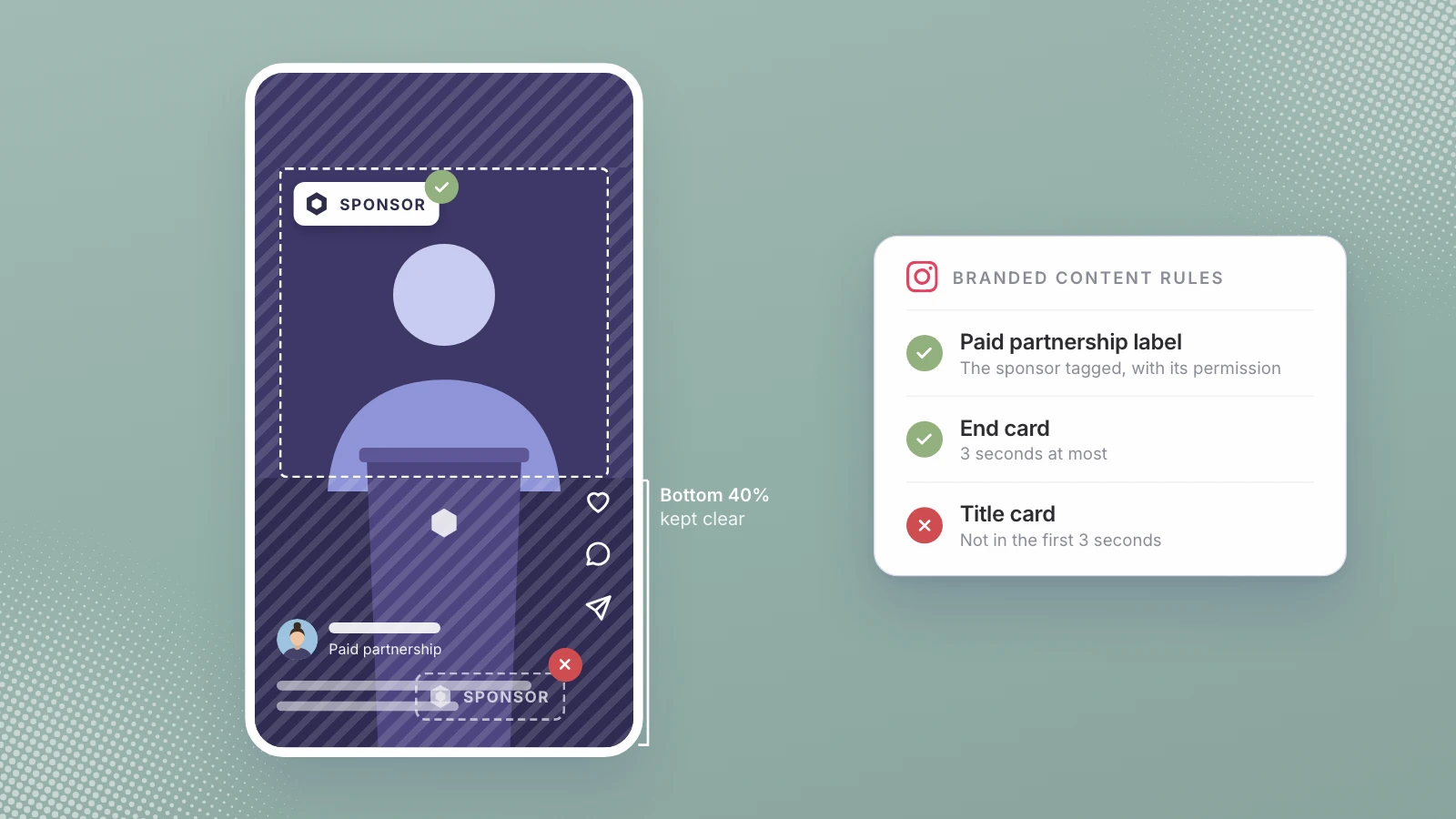
- No banner ads and no early title cards. The format rules say not to include banner ads in videos or title cards in a video’s first three seconds, and that mid cards or end cards “must not persist for longer than three consecutive seconds.”
- Check the sponsor’s category. Some categories are prohibited outright, including tobacco and vaping products, and some can only be promoted with restrictions. Alcohol is on the restricted list, which matters for any event with a drinks sponsor: you’ll need to restrict who can see the post by age or location.
This is the step organizers most often skip, because the clip feels like their own content rather than an ad. The policy looks at the exchange of value, not at who held the camera.
What to offer sponsors from the clips
Ask each sponsor before the event what it wants, because the answers shape the shot list. Four things are worth offering:
- The logo seen in context. A wide shot with the backdrop in it says more than a logo pasted over a close-up.
- Its own copy of the files. A version the sponsor can post on its own channels, in vertical and wide.
- Its speaker’s moment. If the sponsor had someone on stage, a clip of that person alone. Signal Visual, a New York studio, sells speaker cuts described as “ready to send to sponsors” (its event coverage page).
- The numbers. When you tag a sponsor with the paid partnership label, Instagram gives the brand partner access to the content’s insights, which saves you building a report by hand. Signal Visual’s multi-day package also lists sponsor activation reports.
Collab post or paid partnership label?
They do different jobs, and a sponsor clip may need both. A collab post is co-authored: if the other account accepts, the post shows on both profiles and goes to both sets of followers. The paid partnership label is the disclosure that money or gifts changed hands. A collab on its own doesn’t disclose the sponsorship.
Two practical details. In a collab, the original author owns the post: if that account deletes it or is deactivated, the post disappears from the collaborator’s profile too, so decide which side publishes it. And Instagram’s scheduler doesn’t support collaborative or sponsored posts (Instagram Help), so put those on the calendar as posts someone publishes by hand.
Where should the logo sit so the app doesn’t cover it?
Meta publishes safe zone guidance for ads, and it works as a rule for any vertical clip. For 9:16 video in Stories and Reels it says to “keep the edges (top, bottom and sides) free of key creative elements, text and logos,” and for Reels ads with disclaimers to leave the bottom 40% clear (Meta Business Help). The profile name, the caption and the buttons sit in those edges. A logo set in from the top corner survives; one in the bottom corner ends up under the caption.
What to agree with sponsors before the event
Put it in the sponsorship agreement, or at least in an email both sides reply to:
- Logo files and placements. Which logo, which color version, and which of the placements above the sponsor approves. That approval is the prior permission Instagram’s policy asks for.
- Where the clips will run. Your channels, the sponsor’s, or both, and for how long.
- Whether the sponsor can run a clip as an ad. Instagram says brands can create partnership ads in Meta Ads Manager if the creator has allowed them to boost the content (About branded content). Decide now whether you will.
- The music. Instagram’s licensed music library is “intended for personal, non-commercial use,” and certain business accounts can’t use it (Instagram Help). A sponsored clip is commercial, so use Meta’s Sound Collection, which Instagram says is royalty free and can be used for commercial purposes like ads, or music you have licensed.
- The speakers. Tell speakers in their brief that their talk will be clipped and posted with sponsor branding. Agreeing before is far easier than taking a clip down after.
How we handle sponsor logos
We film New York events and cut the clips, so this is our business as well as our advice. Sponsor logos can go on the clips in every package, from $450 for one hour on the main panel to $2,000 for multiple cameras and stage lighting, and the social clips are included in all of them. If you’re still planning the recap itself, the event recap video that sells the next ticket covers its structure and timing, and what an event videographer costs in New York compares studio prices.
If your sponsors are already signed for a New York event, send us the logo list and the date. We’ll plan the shots around the placements they approve, so every clip carries the right logo in the right place. See how we film events for organizers.
A sponsor’s logo should be easy to spot and easy to share, and never the thing a viewer has to look past.
Sources
- Instagram Help Center, Branded Content Policies
- Instagram Help Center, How to use the paid partnership label
- Instagram Help Center, About branded content on Instagram
- Meta Business Help Centre, About text overlays and the Safe Zone for ads
- Instagram Help Center, About collab posts on Instagram
- Instagram Help Center, How to create and manage scheduled posts and Reels
- Instagram Help Center, Access to the licensed music library on Instagram
- Signal Visual, Corporate event photography and videography, New York
Written by Lera Leonteva. Prices and rules change; each one is linked to its own page, read November 2026.