Video Scaling Strategies · Issue 10

Why I wouldn't pay anyone to get an account back

If you search for help with a disabled Instagram account, the first page is almost entirely people selling recovery, and almost none of them can do the thing they’re selling.

In short

There is no paid queue and no contact inside Meta you can buy. The only route Meta publishes is a review request made by logging into Instagram and following the on-screen instructions, and it is free. Recovery services submit that same request and charge for the accounts that were going to return anyway. Meta Verified makes no promise about restoring a disabled account.

Hi, I’m Lera. Every issue of Video Scaling Strategies uses what the market is actually doing to explain why some video earns attention and some doesn’t.
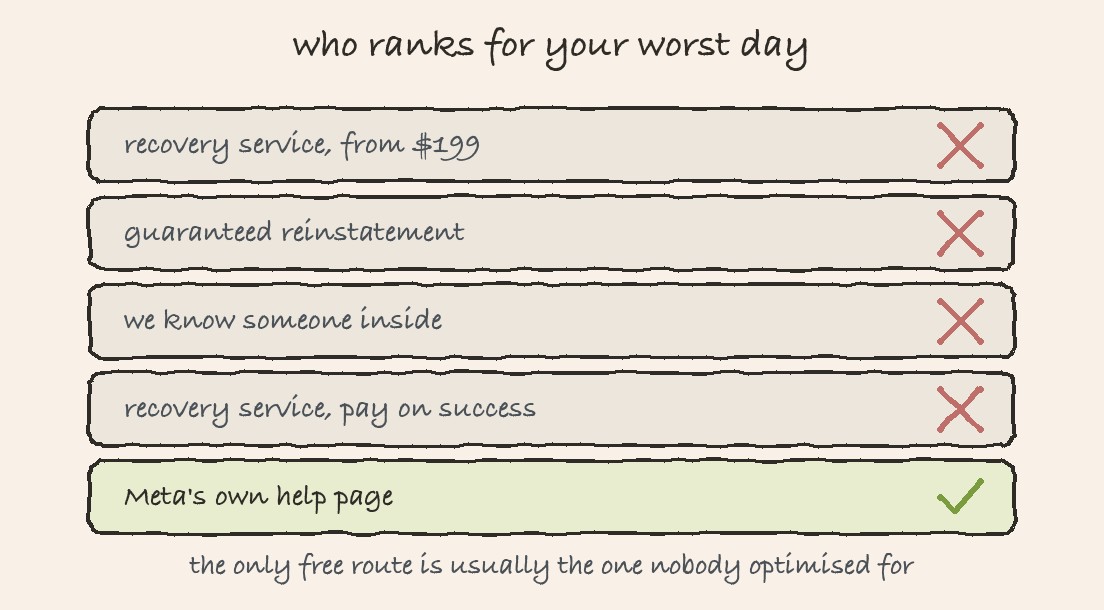
Five search result rows. Four sell recovery and are crossed out. The last is Meta's own help page and is ticked.
Roughly how the first page of results looks, with the free route rarely near the top.

There isn’t a paid queue, and there’s no contact inside Meta you can buy. The review happens through the app, and it’s free, which I think is worth saying plainly before anything else.

This issue exists because of a search result. If you type a query about a disabled Instagram account into any search engine and count how many of the first ten results are selling recovery, it’s usually most of them, while Meta’s own help page, the one with the actual instructions, is often nowhere near the top.

That gap is a business model, and I think it works because of who is searching. Someone who has just lost an account is frightened, is losing money every day, and will pay almost anything to a person who sounds confident.

How the business works

  • The service submits the same in-app review you can submit yourself, for free, in four minutes.
  • A percentage of accounts come back on their own, because automated enforcement has false positives. Every one of those is presented as a win for the service.
  • Pricing is usually success-based, which sounds fair and is actually what makes the model work: a high fee on the accounts that were going to return anyway.
  • The ones that do not come back get an explanation about Meta being difficult, and there is no refund process because there is no contract you would want to test.
  • A smaller and nastier tier asks for your login, your ID or a payment to a person on a messaging app. That is a second incident, not a recovery.
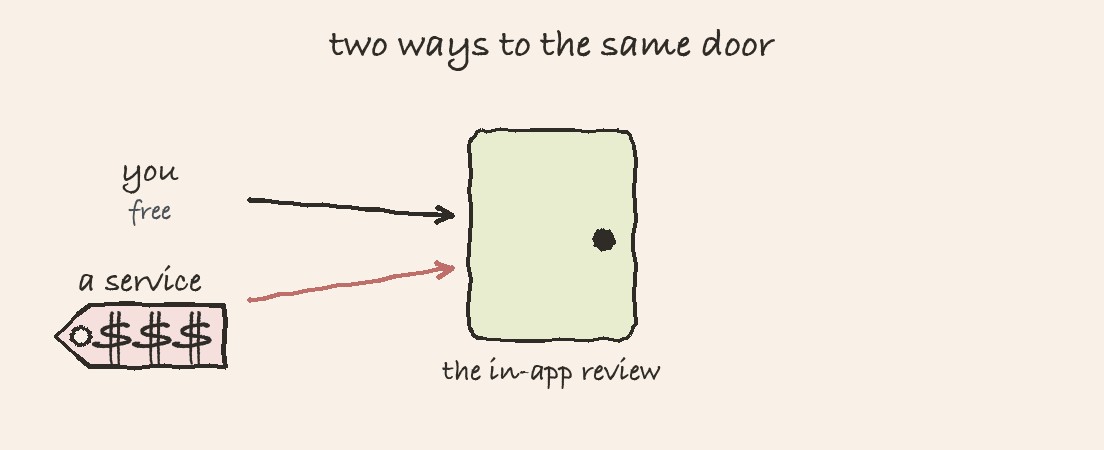
Two arrows reaching the same door. One is labelled you, free. The other is a service with a price tag.
Both routes end at the same in-app review.

The routes that really exist

RouteWhat it isHonest odds
In-app reviewLog in, read the screen, follow the on-screen instructions. Meta’s only published route.The real one. Often offered once, so do it carefully.
Account StatusThe in-app page listing what was actioned and whether a review is available.Diagnostic rather than recovery, but it tells you what you are arguing about.
Meta VerifiedA paid subscription, $14.99 a month for a standard Instagram profile.Its page describes impersonation monitoring and support access. It makes no promise about restoring a disabled account, and you should not read one into it.
A lawyerReal in narrow situations, such as a business dispute or a rights matter.Expensive, slow, and the Terms route most consumer disputes to individual arbitration.
Paying a recovery serviceThe in-app review, with a markup.You are buying the outcome you already had, at a price set by your panic.

How I’d spot one quickly

  • A guarantee. Nobody outside Meta can guarantee a reinstatement, so a guarantee is proof of the opposite.
  • A named contact at Meta. Selling access to an insider is either untrue or describes bribery.
  • Asking for your password, your two factor code or your government ID.
  • A 24 hour turnaround claim. Meta’s own review has no published timeline at all.
  • Urgency about a countdown they have quoted to you as fact, when Meta publishes no deadline for any of this at all.

I’m aware we’re not immune to the incentive I’m describing. Leo AI sells software that publishes to Instagram, and a newsletter about account risk is obviously marketing, so here’s the boundary I hold us to: we will never claim our product prevents a Meta ban, and we will never offer to get an account back, because we don’t have that power, and neither does anyone charging you for it.

Frequently asked questions

Can anyone guarantee getting a banned Instagram account back?

No. Nobody outside Meta can guarantee a reinstatement, so a guarantee is evidence against the seller rather than for them.

Does Meta Verified help recover a disabled account?

Its page describes impersonation monitoring and access to support. It makes no promise about restoring a disabled account, and you should not read one into it.

Is there an Instagram appeal form?

Meta publishes no form. Its disabled accounts page says you may be able to ask for a review by logging in and following the on-screen instructions.
In short

The studio podcast look comes from light, lens and mic placement, not an expensive camera. A used camera with a fast lens, a gridded key light and a dynamic mic close to the mouth get you there for well under $1,000 per person. No studio? Coworking operators rent meeting rooms by the hour with no membership, from about $30 an hour in New York.

Hi, I'm Lera. Every issue of Video Scaling Strategies uses what the market is actually doing to explain why some video earns attention and some doesn't.

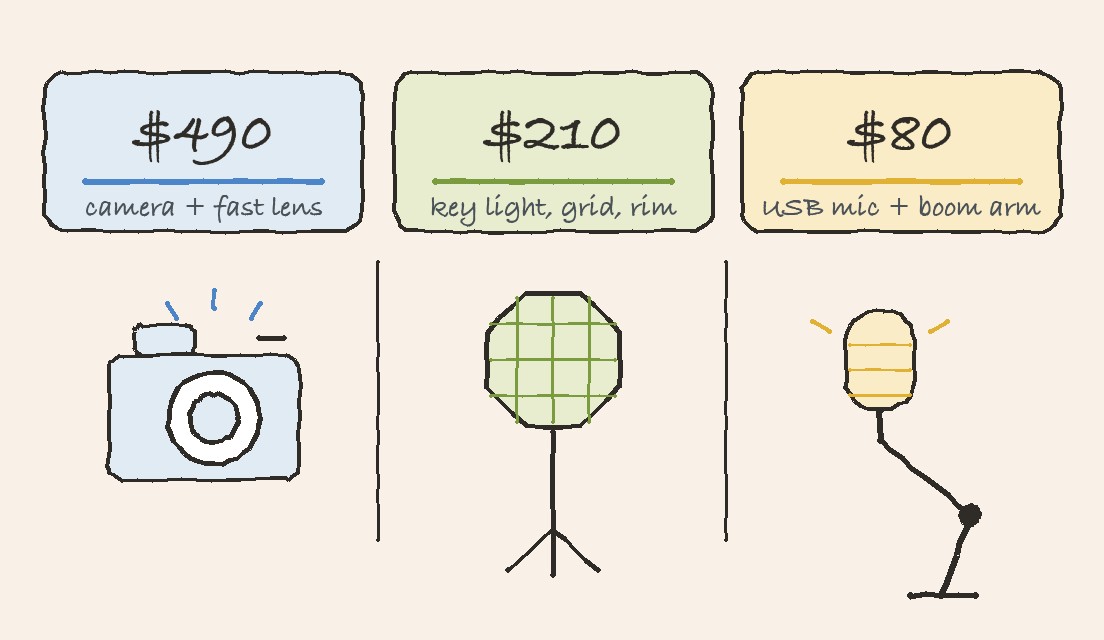
Three cards: about $490 for a used camera and fast lens, $210 for a key light with grid and a rim light, $80 for a USB mic and boom arm.
A studio-quality one-person setup, bought used. The camera is the biggest line and the smallest part of the look.

It's the Light, Not the Camera

When a video podcast looks expensive, the first guess is the camera. It's usually the light. Take this episode of Founder Mode (a German-language podcast for founders) with Andre Retterath, a partner at the European venture capital firm Earlybird: a warm, dim set with a wood-slat wall and a lamp, a face lit softly from one side, the background melting into blur, a broadcast mic (the large microphone radio hosts talk into) close to the mouth.

None of that needs a cinema camera (the kind used to shoot films). It needs three things: light that stays on the speaker and off the wall, a fast prime lens (a lens with one fixed zoom and a wide opening that lets in lots of light), and dynamic mics (sturdy microphones that mostly pick up what is right in front of them) close to the mouth.

An expensive camera in bad light looks cheap. A used $400 camera in good light looks like a studio.

The Camera: Two Ways to Buy It

Prices are per camera angle. Any large-sensor mirrorless body (a camera with swappable lenses and a much bigger image sensor than a phone, sold without a lens) will do. The lens, not the body, gives you the blurred background. Look for a low f-number like f/1.4 (how wide the lens opens: lower means more light and more blur) and a focal length (how zoomed in the lens is, in mm) of around 30 to 35mm.

Cheapest: buy used · about $490 per camera

Body: Sony a6000, used ($415 to $520). Lens: TTArtisan 35mm f/1.4 or 7Artisans 35mm f/1.4, new ($69 to $73). Manual focus (you turn the focus ring by hand), so set it once and sit still. It stops every 29 minutes and warms up on long takes: restart at natural breaks and power it from the wall with a dummy battery (a battery-shaped adapter that plugs into a socket). A used Panasonic G7 ($300 to $340) is cheaper still; pair it with a 25mm lens for the same framing.

Easiest: buy new · $940 to $1,170 per camera

Body: Sony ZV-E10 ($748). Lens: Viltrox 33mm f/1.4 or Sigma 30mm f/1.4 ($191 to $419). Eye-tracking autofocus (the camera finds your eyes and keeps them sharp by itself) means no one has to stand behind it. Record in HD (standard 1080p video) with the overheat setting (Sony calls it Auto Power OFF Temp) on High for takes of up to about an hour. Canon’s EOS R50 is the alternative, at up to 59:59 per clip (one continuous recording).

Lighting: Where the Money Shows

This is the part that reads as expensive. The job is to light the face and keep the back wall dark, with a key light (the main light on your face), a softbox (a fabric cover that makes that light soft and even), a rim light (a small light behind you) and accent lights (small lights on the back wall for mood).

Lighting kit for a one-person video podcast set
WhatPickPrice
Key lightGodox SL60IID, Amaran 60x S or Neewer CB60B$120 to $160
Softbox35 in (90 cm) octabox (an eight-sided softbox) with a honeycomb grid (a fabric mesh that stops light spilling sideways)$60 to $100
Rim lightSmall RGB LED (a light that can change color), like the Ulanzi VL49about $30
AccentsLED light bar, or a warm lamp you already own$0 to $50

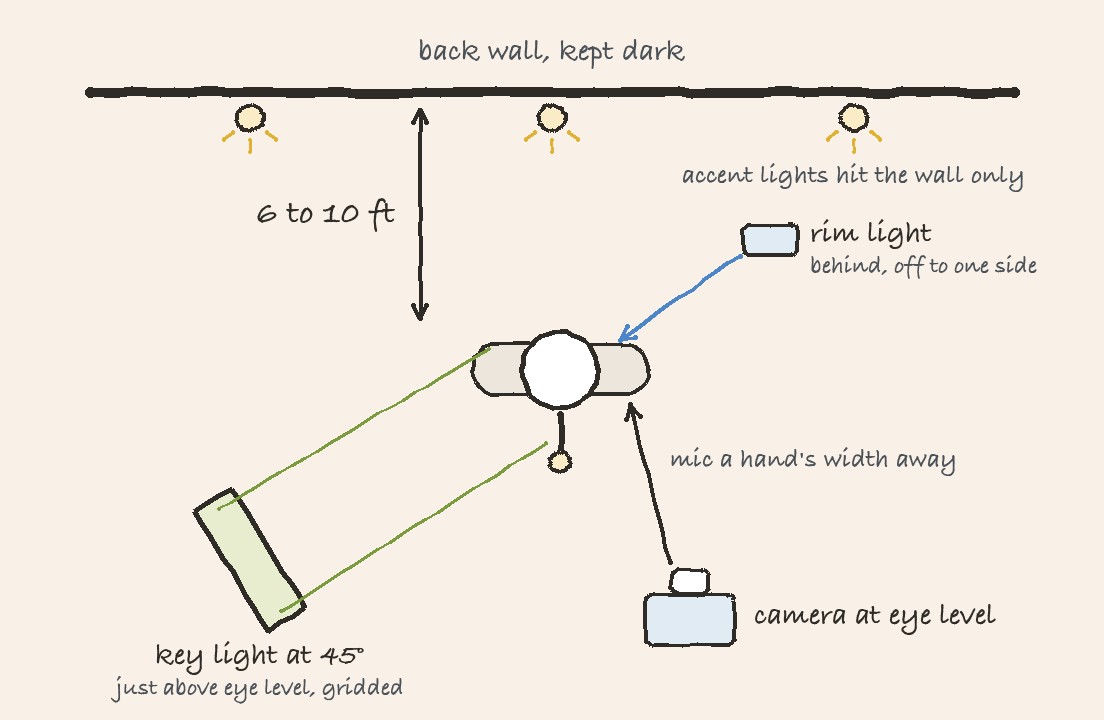
The grid is the piece people skip. It stops the soft light spilling onto the wall, which is what lets the background fall into shadow. A rim light behind you draws a thin edge on your hair and shoulders so you don't melt into it.

Top-down set plan: the speaker sits 6 to 10 feet from a dark back wall with accent lights on it, a gridded key light at 45 degrees in front, a rim light behind to one side, the mic a hand's width from the mouth and the camera at eye level.
The whole set from above. One key light, one rim light, and accents that only touch the wall.

Audio: Dynamic Mics, Close to the Mouth

Studio podcasts sound warm and close because the mic is close. A dynamic mic a hand's width from the mouth hears the voice and very little of the room, which matters most when the room isn't yours.

Mics connect one of two ways: USB (straight into a laptop) or XLR (the three-pin cable professional audio gear uses). XLR needs an interface (a small box that turns the mic's signal into something your computer can record).

Audio kit for a video podcast
WhatPickPrice
MicrophoneFifine K688 or Samson Q2U (USB and XLR), or Rode PodMic (XLR)$55 to $100
InterfaceFocusrite Scarlett Solo for one XLR mic, Vocaster Two for two$140 to $250
MountingDesk boom arm (a jointed arm that clamps to the desk and holds the mic)from $25

The K688 and Q2U plug straight into a laptop over USB, so a solo host can skip the interface. Add one, and move to XLR, when a guest joins.

Four Placement Rules

Sit 6 to 10 feet from the back wall

Distance is what blurs it. Against the wall, even a great lens can’t.

Put the key light 45° to one side

A little above eye level.

Keep every camera at eye level

Looking up or down at a speaker reads as amateur.

Shoot a neutral, flat picture profile

(the camera’s built-in color and contrast setting). Flat keeps detail in a dark set. Use log (an extra-flat profile that looks washed out until edited) only if you will color grade (adjust the colors in editing).

No Studio? Rent a Meeting Room by the Hour

You don't need a lease or a coworking membership to record somewhere that looks professional. Most operators rent meeting rooms by the hour to anyone:

Meeting rooms bookable by the hour without a membership
WhereHow it works without a membershipNew York price
WeWork On DemandBook a room by the hour in the app and pay as you gofrom $8 a seat per hour
RegusBook meeting rooms online across 69 Manhattan locationsfrom $35 an hour
DeskpassNo membership, and it now lists the rooms of Breather (a meeting-room app it merged with in 2024)from about $30 an hour
LiquidSpaceOne free account for hourly rooms across coworking brands, podcast rooms includedfrom about $50 an hour
PeerspaceRooms and fully kitted podcast studios from local hosts (people and businesses renting out their own space), usually a 2-hour minimum$35 to $100 an hour

Then Make the Episode Earn Its Keep

A well-shot 40-minute conversation holds far more than one post. Most teams publish the episode, cut one clip, and move on.

In Issue 4, a podcast editor explained why shows stall around episode 10. The ones that keep going treat every recording as a library of clips, not a single upload. See how Leo AI edits your video into scheduled social posts.

Written by Lera Leonteva. Prices are US street prices checked in September 2026 at B&H, MPB, Sweetwater, Focusrite, Sigma, Amaran, Neewer and Ulanzi; camera prices have moved with tariffs this year and used prices vary by condition. Recording limits from Sony’s help guides and recordinglimits.com. Room prices are New York rates from WeWork, Regus, Deskpass, LiquidSpace and Peerspace.

Frequently Asked Questions

What teams ask before they buy their first light.

What is the cheapest camera setup for a professional-looking video podcast?

A used Sony a6000 with a TTArtisan or 7Artisans 35mm f/1.4 lens, about $490 per camera in September 2026. The camera matters less than the light: a gridded key light and a dynamic mic close to the mouth do more for the look than a more expensive body.

Why does lighting matter more than the camera?

The expensive look is a face lit softly from one side while the background falls into shadow. That comes from a key light in a softbox with a honeycomb grid, which keeps the light on the speaker and off the wall. An expensive camera in bad light still looks cheap.

What microphone should I use for a video podcast?

A dynamic microphone a hand's width from the mouth, because it picks up the voice and very little of the room. The Fifine K688 and Samson Q2U connect by USB or XLR, so a solo host can plug straight into a laptop. The Rode PodMic is XLR only and needs an interface such as a Focusrite Scarlett Solo, or a Vocaster Two for two mics.

Do budget cameras have recording limits?

Yes. The Sony a6000 stops every 29 minutes and can overheat on long takes, so restart at natural breaks and power it with a dummy battery. The Sony ZV-E10 records HD for up to about an hour with its overheat setting on High. The Canon EOS R50 records up to 59:59 per clip.

Can I book a coworking meeting room without a membership?

Yes. In New York, WeWork On Demand rents rooms by the hour from $8 a seat, Regus meeting rooms start at $35 an hour in Manhattan, Deskpass from about $30, LiquidSpace from about $50, and Peerspace lists rooms and podcast studios at $35 to $100 an hour, usually with a 2-hour minimum.

How far should I sit from the back wall?

Six to ten feet. Distance is what blurs the background. Sitting against the wall flattens the shot even with a good lens.

Lera Leonteva
Lera Leonteva
CEO & Founder, Leo AI

Lera Leonteva is the founder and CEO of Leo AI, where she works on turning long-form footage into short-form video that earns attention on its own merits. She writes Video Scaling Strategies, taking one piece of content that worked and one that did not, and using what the market is doing to explain the gap.

Have a video?

Leo AI edits it into scheduled social posts, guided by what your audience actually watches.

See this working on your own channels

Leo turns your existing footage into posts and shows what each one earned. Book a demo or see the channels Leo posts to.