
Film one slow, continuous tour with the phone held vertically: the street and entrance, the best room first, then the kitchen, living space, bedrooms, bathrooms and any outdoor space or view. Put only the address, price, beds, baths and your brokerage on screen. Keep some rooms back for a second post and tell viewers to follow for part 2.
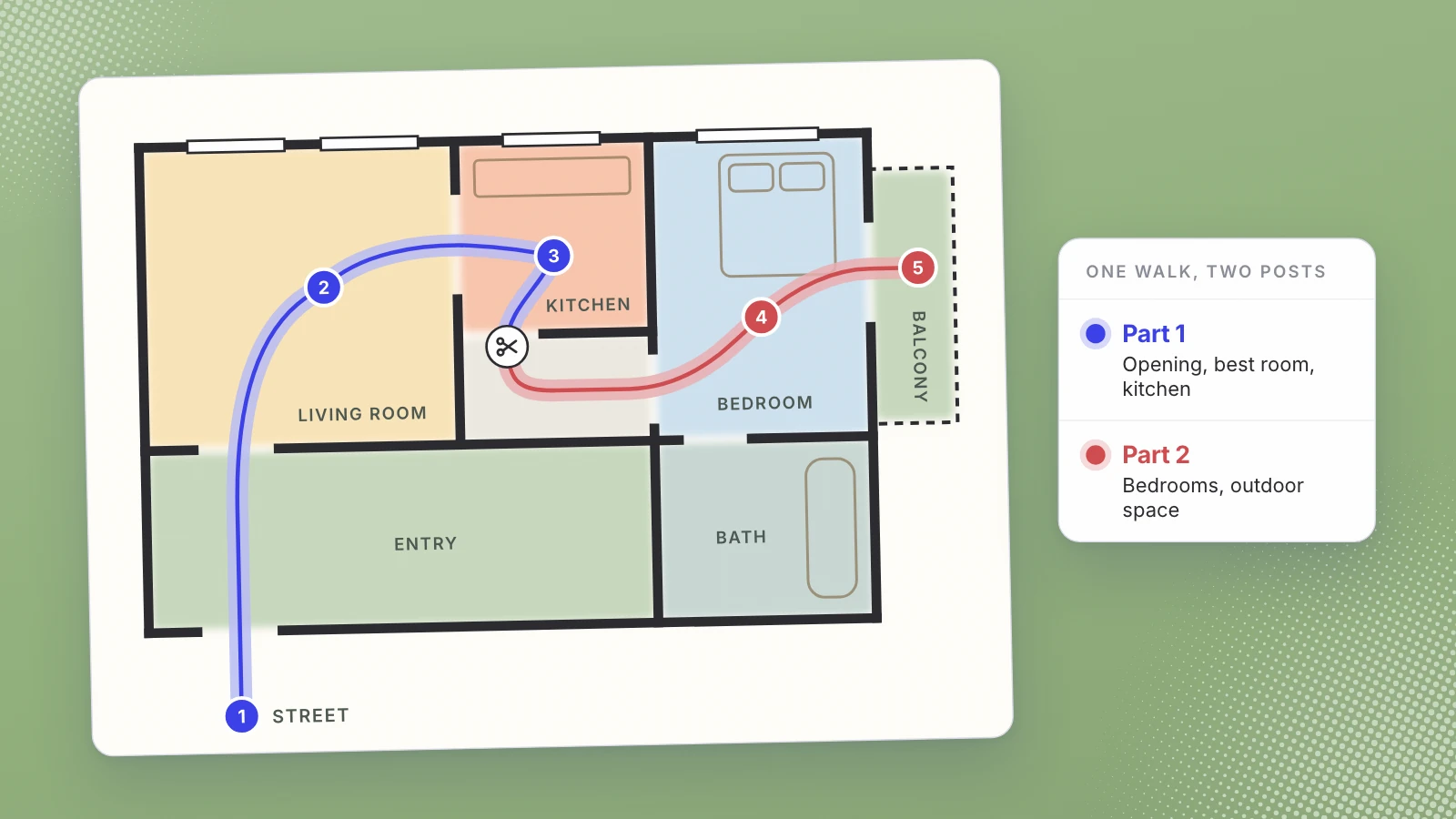
Most listing videos are made in a hurry after a showing, on a phone, by the agent. That’s fine. A Reel or a Short doesn’t need a crew. It needs a planned route through the home, a steady hand and less text on screen than you think. This is the shot list I’d use for one tour that has to become at least one good post, and ideally two.
Plan the route before you press record. The order you walk is the order people watch.
Before you press record
- Get the go-ahead. In New York a property can’t be advertised without the owner’s authorization, and a salesperson’s post needs their broker’s approval (19 NYCRR 175.25(b)). Settle both before you film, not after.
- Every light on, every blind up. Lamps, overheads, under-cabinet lights. An evenly lit room is far easier for a phone to film than a dark one with one bright window.
- Clear the counters and the personal things. Family photos, mail, anything with a name or a face on it. The seller will thank you.
- Walk the route once without filming. Decide which room opens the video and where the tour ends.
- Quiet the place. Notifications off, TV off, dishwasher finished. If you plan to talk, every other sound competes with your voice.
The shot list, in walking order
Film it as one continuous walk if you can. Hold each opening shot for two or three seconds before you move, and pause briefly at every doorway. Those pauses give the edit clean places to cut.
- The street, then the door. A few seconds of the block or the building entrance tells people where they are. Keep the house number or the lobby sign in frame only if the address is public.
- The best room first. Whatever sells the place: the living room with the light, the view, the kitchen. Open with it, even if the floor plan puts it in the middle.
- The kitchen. A slow pass along the counters, then one shot that shows how it connects to the living space.
- Living and dining space. Stand in a corner and turn slowly with your whole body so people can read the size of the room.
- Bedrooms, main first. A doorway shot, then a step inside. Show the closet if it’s a selling point.
- Bathrooms. One steady shot from the doorway is usually enough.
- Outdoor space, the view, the building. Balcony, yard, roof deck, gym, laundry room. In a building, the lobby and shared spaces count.
- One closing shot. Back to the best room, or out to the street. It gives the clip an ending instead of a cut-off.
That route runs a few minutes at walking pace, which is why I’d film it in one take. Lot70 films up to five minutes through your phone’s camera and cuts the clip from that one walk, so a single take is all it needs.
How to hold the phone
- Vertical, the whole time. Reels and Shorts are tall. Instagram accepts reels with an aspect ratio “between 1.91:1 and 9:16” (its help page), and YouTube’s Shorts upload page asks for a square or vertical video. Filming vertical means nothing important gets cropped later.
- Both hands, elbows in, chest height. Walk slower than feels natural, and turn your body rather than swinging your wrist.
- Walk closer instead of zooming. Moving through the space shows its size; zooming flattens it.
- Keep it level. Point at the room, not the ceiling or the floor. Tilted vertical lines look like a mistake.
- Film across bright windows, not into them. Stand so the window is at the side of the frame and the room stays readable.
Talk, or stay quiet?
Both work. If you talk, say the things a buyer can’t see: the monthly charges, the morning light, how far the train is. Don’t narrate what’s on screen (“and here’s the kitchen”); the viewer can see the kitchen. If you’d rather not talk at all, stay silent and Lot70 adds a voiceover to the clip.
Whatever is said becomes part of the ad, so the honesty rules apply to the voice as much as to the caption. New York’s rule asks for “an honest and accurate description of the property” and the real name of the area it’s in.
What goes on screen
Less than you think. Four facts and a name:
| On screen | Why it earns the space |
|---|---|
| Address, or building and neighborhood | A buyer knows where it is without opening the caption |
| Price | It saves a round of “DM for price” messages |
| Beds and baths | The quickest summary of the layout |
| Your brokerage’s name | New York treats a listing post as advertising and requires the brokerage on it |
Everything else goes in the caption: your licensed name and license type, the brokerage’s address or phone number, and any detail that didn’t fit. I’ve set out what New York asks for in your listing video is your brokerage’s ad.
One more rule shapes the words. Federal fair housing rules make it unlawful to publish a housing ad that indicates a preference based on race, color, religion, sex, handicap, familial status or national origin, and 24 CFR 100.75 gives as an example “using words, phrases, photographs, illustrations, symbols or forms which convey that dwellings are available or not available to a particular group of persons.” Describe the home, not the people you imagine living in it: “three bedrooms, two blocks from the park,” not who it’s perfect for.
Making a part 2
One tour usually holds more than one good clip. Rather than squeezing every room into a few seconds each, split it. Part 1 is the opening, the best room and the kitchen. Part 2 is the bedrooms, the outdoor space and the building. When footage is left over after the clip, Lot70 adds a “follow for part 2” card to the end.
That card is a promise, so keep it. Post the second part while the listing is still fresh, give it its own opening shot rather than starting mid-hallway, and put the same four facts and the brokerage on it. Someone may see part 2 without ever seeing part 1.
Specs to check before you post
- Instagram Reels: an aspect ratio between 1.91:1 and 9:16, a minimum of 30 frames per second and 720 pixels, and a recommended cover of 420 by 654 pixels (Instagram Help Center).
- YouTube Shorts: a square or vertical video, up to 3 minutes long (YouTube Help).
Neither limit is the real constraint for a listing clip. Attention is. Show the best of the home early and keep the clip as short as the rooms allow.
Where Lot70 fits
We built Lot70 for exactly this walk-through, so take this as the part where I recommend our own product, with that interest declared. It opens your phone’s camera in the browser, with no app to install and no file to upload. You film up to five minutes, talking or not, and about a minute later you get a vertical clip with captions and graphics. While it cuts you add the address, price, beds and baths; the brokerage is required, and its name goes on the clip. It posts to an Instagram business or creator account, or to YouTube Shorts, from your own account, and your upload is deleted in 24 hours. The first seven posts on each channel are free, then $4 a post, $16 for five in a week or $39 for fifteen in a month. It’s for licensed New York brokers and salespersons, 18 or over.
Next showing, walk the route once, film it vertical in one take, and keep the screen to four facts and your brokerage. Try Lot70 on your next tour and see how many posts one walk-through gives you.
Film the walk once. Post it twice.
Sources
- Instagram Help Center, Reel size and aspect ratios on Instagram
- YouTube Help, Upload YouTube Shorts
- Code of Federal Regulations (Cornell LII), 24 CFR 100.75, Discriminatory advertisements
- New York Codes, Rules and Regulations (Cornell LII), 19 NYCRR 175.25, Advertising
Written by Lera Leonteva. Prices and rules change; each one is linked to its own page, read November 2026.